
When it comes to creating bootable USB drives, most people are familiar with the traditional process: you pick an ISO, run a tool to burn it onto the drive, and then repeat the whole thing whenever you want to try a different operating system. It works, but it’s clunky. Every time you want to switch, you have to wipe the USB clean and start again. That’s where Ventoy completely changes the game.
The Old Way: Wipe and Rewrite
Before Ventoy, my workflow looked something like this:
- Download an ISO.
- Use a tool like Rufus or Etcher to write it to the USB.
- Wait for the process to finish.
- Realize I wanted to test another distro or utility.
- Wipe the USB and repeat the whole process.
It wasn’t just time-consuming—it was frustrating. If I wanted multiple ISOs ready to go, I’d need multiple USB sticks. That’s not exactly efficient.
The Ventoy Way: Copy and Paste
Ventoy flips the script. Instead of burning one ISO at a time, Ventoy installs a small bootloader onto the USB once. After that, the USB is essentially “Ventoy-enabled.” From there, all I have to do is copy and paste ISO files directly onto the drive—no formatting, no rewriting, no waiting around.
Want to test Ubuntu, Fedora, and a rescue toolkit? I just drop all three ISOs onto the USB. When I boot from it, Ventoy gives me a menu to pick whichever ISO I want. It’s that simple.
Why It’s Better
- Time-saving: No more waiting for a tool to finish writing an image. Copying files is faster and more straightforward.
- Flexibility: I can keep multiple ISOs on one stick. It’s like carrying a toolbox instead of a single screwdriver.
- Convenience: Updating an ISO is as easy as deleting the old file and pasting in the new one.
- Efficiency: One USB drive can serve dozens of purposes. I don’t need to juggle multiple sticks anymore.
How to setup
Download the latest version here
Extract the ZIP file and run Ventoy2Disk
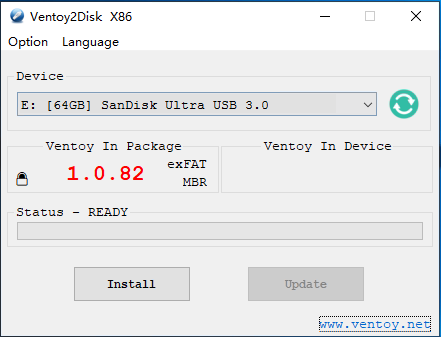
Choose the correct USB device and click install
One complete copy any required ISO files to the USB stick
When you then reboot and boot from the USB disk, you should see something like this
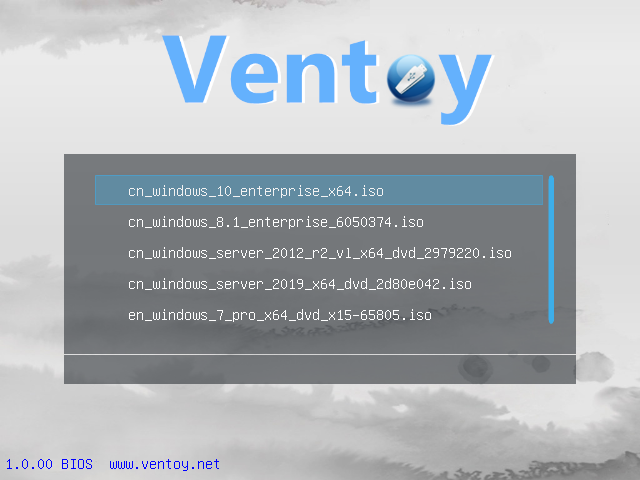
Select the ISO you wish to boot and away you go
Final Thoughts
Ventoy has turned what used to be a tedious chore into something effortless. Instead of constantly wiping and rewriting, I just copy and paste. It’s the kind of tool that feels obvious once you start using it—like, why wasn’t it always this way? For anyone who regularly tests operating systems, troubleshooting tools, or rescue environments, Ventoy is a must-have.


